
Skip to content

Website redesign complete (at last)…

After using the same design for 5 years, we’ve finally got round to redesigning our website. The old site served us very well, generated a nice steady stream of traffic through organic listings on Google and was well liked; but it was beginning to show it’s age. The underlying HTML changed over the years from table based HTML 4.0.1, to XHTML with some fairly hacky JavaScript pull-down menus, a finally to XHTML-Strict and JQuery for all the client-side functionality. All this change was behind the scenes, with very little of the site content or visual appearance was updated.

After debating creating a custom CMS in Zend Framework, we finally decided to do the whole thing in WordPress, building a custom theme from scratch. As with all CMS type systems, the real pain was in coming up with a navigation system that was reasonably flexible without looking too generic. We also waited months for WordPress 3 to be released – as it included a number of new features, such as Custom Post Types, that were going to be useful to us.

We’ve used a fair sprinkling of cutting edge technology in creating the front end for the site, but it’s all implemented using the ‘Progressive Enhancement‘ methodology, so it should look acceptable in most browsers and be accessible for all. I’m sure there are a few things left to tweak, but part of the joy of doing your own site is that you can keep fiddling with it until it feels right…

Most of the new content is about the web design and development services we provide, so it’ll be interesting to see how quickly we start to appear in Google for our chosen keywords and keyphrases. Over the coming months we’ll be checking our Google Analytics results and massaging the copy to better hit our Search Engine Optimisation goals…
Posted in Web Development, Wordpress | Tagged , , , | Comments Off on Website redesign complete (at last)…

What is SSD and should my MacBook have one?

One of the main reasons that laptop performance lags behind that achieved on desktops is down to one thing. Hard drive performance. Modern computers running MacOS or Windows spend a large part of their time writing temporary data to the hard drive, and that’s 1000s of times slower than reading data from memory (RAM). This means that the faster the hard drive, the more quickly the computer can continue doing what you asked it to do.

Laptops have slower drives than desktops, simply because the disks are less wide and hence the read heads are passed over the drive surface more slowly. Recently Solid State Drives, (SSDs) have started to solve this problem – instead of storing data on magnetised metal platters, they use RAM chips. Currently they are very expensive, but the performance boost is very noticeable, especially if you are using ‘scratch disk’ intensive programs like Photoshop.

You can custom configure any MacBook you buy from the AppleStore with an SSD, so next time you’re in the market for new hardware, give it some thought…

Posted in MacBook | Tagged , , , , | Comments Off on What is SSD and should my MacBook have one?

iPhone 4 – Poor signal strength?

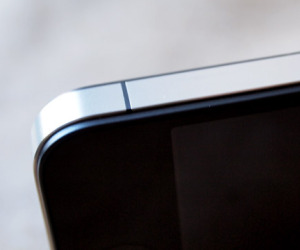
Holding the bottom corner of the iPhone 4 can cause signal problemsIf you are one of the early adopters who has bought the iPhone 4, you may be a little disappointed by the mobile signal strength you get. This has been an on-going complaint of iPhone users since the very first models with various complicated technical reasons; however for iPhone 4 owners, the solution may be a little more prosaic.

The antennae in the iPhone is integrated into the steel band that wraps around it. When you touch it with bare skin, especially in the bottom right hand corner, the signal strength drops dramatically. If you are ‘sinister’ like me, you’re more likely to hold the phone so that you touch this area. So bar chopping your fingers off or rapidly becoming ambidextrous, what’s the solution? Easy get one of the iPod bumpers

Posted in Troubleshooting | Tagged | 1 Comment

iPod stuck at black screen with Apple logo

If you find that your iPod is stuck on the loading screen with the white Apple logo and black screen, you may have to do a bit of finger wizardry. First, just try resetting the iPod. If that fails, try to put the iPod into hard disk mode. Then plug the iPod into the Mac and Restore it when iTunes opens. If that fails, try reformating the disk first.

Posted in Troubleshooting | Tagged | Comments Off on iPod stuck at black screen with Apple logo

Why HTTP Status codes are at the heart of SEO…

Anyone developing websites that have pretentions to generate long-term traffic, beyond the lifespan of any initial marketing activity, needs to know a little bit about Search Engine Optimisation (SEO) . It’s really not a difficult set of rules to follow; generate relevant content, modify your html structure a bit, cultivate inbound links and get indexed.

Let’s examine the ‘cultivate inbound links’ part of the equation. If you are starting a website from scratch your task is made easier, because you don’t have to worry about the legacy of the old URLs stored in search engines, affiliate sites, link-exchange programs and the like that lead to your content. But what happens when you already have plenty of inbound traffic to a site, your pages are highly ranked on Google, but you want to move to a new blog or CMS? If you just change the URLs, you might lose all the hard earned PageRank that you have accrued over months or years, and have a very unhappy client when their site drops out of their Top 10 targeted searches.

You could try to redevelop the site and use the existing site url structure, but frequently the choice of blog or CMS limits that possibility. Typically you end up creating ‘mod-rewrite’ rules on your web-server that say “if someone wants this URL, show them this nice shiny new URL.’ And this is where we need to know about HTTP Status codes. Those re-write rules also need to tell Google to update its index to point at our nice shiny new URLs, and to do this we send a 301 Permanant Redirect header along with the new URL. This says to Google “that URL that you requested has moved to this new address, please remember that in future.”

What about when someone visits from a really old link that you haven’t managed to setup redirect rules for? In that instance you send a 404 Not Found header and hopefully some useful html to help the visitor find what they were looking for. Cool 404 pages were all the buzz a few months ago, but the critical bit is not the content that the visitors can see, but the 404 header. Why? Because search engines won’t index pages with a 404 header set, which stops your Google search results filling up with unhelpful “Page not found” entries.

And how about the final part of the equation? Get indexed. Imagine a scenairo when you are uploading significant changes to the website and GoogleBot just happens to choose that moment to try to re-index you site. The worst case scenairo would be your search index gets filled up with page after page of broken or mangled content. A much better solution would be to make a site-wide change so that during updating and/or testing, the server sends a 503 Service Unavailable header, so that Google knows to come back in a few minutes once the site is back up and running.

P.S. None of this is rocket science, but actually implementing it can be a royal in the arse. Sniffing out the response codes is the first port of call, and I’m rather fond of HTTP Client on my Mac.

Posted in Search Engine Optimization, Web Development | Comments Off on Why HTTP Status codes are at the heart of SEO…